The issue
So I’ve been running some websites on repurposed laptops in my apartment. They reach internet via the Wi-fi network of my complex, which uses CGNAT, therefore the private IPs of the laptops are not reachable from outside. I found 3 options:
- Getting a home gateway with a static public IP from an internet provider, and configuring traffic forwarding via DNAT (~40€/month)
- Migrating my infrastructure to AWS (~∞€/month)
- Cheap cloud VM proxying traffic (~2€/month)
Easy choice.
The concept
Under CGNAT (and NAPT in general which is the NAT variant used for most routers), all devices are in a private network. They can send requests to public servers and receive the response because NAPT maps every connection from a private IP to its public IP + a specific port. However, traffic from outside has no way to specify which server behind the NAT it wants to contact, which makes it hard to expose ports to internet.
If the server behind NAT were the one to start a connection, however, the problem would be solved because of the NAPT mapping. That’s why we use a cloud VM (VPS) as a proxy. Here is the data flow:
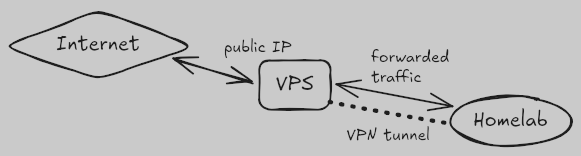
What matters here is the VPN tunnel. The server creates the VPN connection because it can reach the VPS, and once the tunnel is active, both machines can communicate via a virtual interface easily. The VPS thus forwards all traffic to the server, and it bounces back to the client.
The implementation
Once we have a VPS with a static public IP address, we’ll start with a kernel parameter to tweak, for it to be a proxy. Set net.ipv4.ip_forward to 1.
VPN tunnel
Then we install the VPN on it. I like WireGuard. The package name is “wireguard” or “wireguard-tools” for most Linux systems. It works with one conf file per connection and an asymmetrical cryptography layer that we don’t strictly need but considering TLS private keys are sometimes the number 4 , too much encryption is okay.
For configuration, here is our /etc/wireguard/wg0.conf:
[Interface]
PrivateKey = <vps_priv_key>

Address     = 10.0.0.1/24
ListenPort  = 51820

[Peer]
AllowedIPs = 10.0.0.2/32
PublicKey  = <server_pub_key>
This means we want to create a virtual network interface, wg0, with IP 10.0.0.1 on the VPS and 10.0.0.2 on our server. You can tweak those addresses and the port. For the private key, generating it is wg genkey. Run echo "<priv_key>" | wg pubkey to get a corresponding public key; you need to get a private/public key couple for both the VPS and the server.
Talking about the server, we install WireGuard on it as well, and a working conf file looks like this:
[Interface]
PrivateKey = <server_priv_key>

Address = 10.0.0.2/24

[Peer]
PublicKey           = <vps_pub_key>
AllowedIPs          = 10.0.0.1/32
Endpoint            = <vps_public_ip>:51820
PersistentKeepalive = 25
The PersistentKeepalive is key: it prevents the tunnel from dropping. Up the connection on the VPS then on the server (e.g. systemctl start wg-quick@wg0 on each machine). You should then be able to ping 10.0.0.2 from VPS and 10.0.0.1 from server !
Traffic forwarding
Now that the machines communicate, we just have to forward traffic. For easy integration I use nftables and a dedicated table (if you’re new to it, my friend iTrooz made a blog post ). Here is my configuration:
table ip nat {
    chain prerouting {
        type nat hook prerouting priority dstnat; policy accept;
        iifname "ens1" tcp dport 80 dnat to 10.0.0.2:80
        iifname "ens1" tcp dport 443 dnat to 10.0.0.2:443
        iifname "ens1" tcp dport 25565 dnat to 10.0.0.2:25565
    }
    chain postrouting {
        type nat hook postrouting priority srcnat; policy accept;
        oifname "wg0" ip daddr 10.0.0.2 tcp dport 80 masquerade
        oifname "wg0" ip daddr 10.0.0.2 tcp dport 443 masquerade
        oifname "wg0" ip daddr 10.0.0.2 tcp dport 25565 masquerade
    }
}
This forwards TCP packets for 80, 443 and Minecraft 🙂↕️ (UDP works just the same), just change the interface name (ens1) to yours.
After applying the rules, if forwarding fails, maybe look into your firewall on server-side and test out with netcat. Or send me a message on Matrix !
I’ve seen people put the firewall routing conf in PostUp / PostDown of WireGuard so that the conf is only up if the wg0 interface is, but for my use case that’s overengineering.
Fun fact: your requests to this site are routed via this exact setup!